toodleTasks Tablet - Toodledo1.6.3
Publisher Description
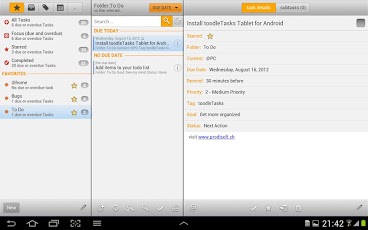
toodleTasks Tablet is a full-featured task management app that synchronizes with Toodledo (www.toodledo.com).
toodleTasks Tablet was specifically designed for tablets.
Main features include:
- Manage your lists (projects, contexts, goals, locations) and view tasks by lists
- Manage your tasks (name, project, context, goal, location, due date, due time, reminder, repeat, priority, tags, status, notes)
- Create and manage subtasks (with a toodledo pro account)
- Filter and sort tasks
- Quick-add tasks
- Full text search
- Actions on multiple tasks (assign to a list, mark complete, star, delete,...)
toodleTasks make it easy to manage your tasks and todo or implement David Allen's GTD methodology on Android Tablets
See http://www.zdnet.com/blog/mobile-news/toodletasks-hd-for-hp-touchpad-best-task-manager-review/4049 for a review of the app (on webOS)
If you are not already a toodledo user, visit the toodledo website at www.toodledo.com to get more information.
Go to the Toodledo.com web site and sign up for a free account
About toodleTasks Tablet - Toodledo
The company that develops toodleTasks Tablet - Toodledo is Prodisoft. The latest version released by its developer is 1.6.3. This app was rated by 1 users of our site and has an average rating of 4.0.
To install toodleTasks Tablet - Toodledo on your Android device, just click the green Continue To App button above to start the installation process. The app is listed on our website since 2014-08-10 and was downloaded 30 times. We have already checked if the download link is safe, however for your own protection we recommend that you scan the downloaded app with your antivirus. Your antivirus may detect the toodleTasks Tablet - Toodledo as malware as malware if the download link to ch.prodisoft.toodletaskstablet is broken.
How to install toodleTasks Tablet - Toodledo on your Android device:
- Click on the Continue To App button on our website. This will redirect you to Google Play.
- Once the toodleTasks Tablet - Toodledo is shown in the Google Play listing of your Android device, you can start its download and installation. Tap on the Install button located below the search bar and to the right of the app icon.
- A pop-up window with the permissions required by toodleTasks Tablet - Toodledo will be shown. Click on Accept to continue the process.
- toodleTasks Tablet - Toodledo will be downloaded onto your device, displaying a progress. Once the download completes, the installation will start and you'll get a notification after the installation is finished.
Program Details
System requirements
Download information
Pricing
Version History
version 1.6.3
posted on 2014-08-10
1.6.3: fix a compatibility issue with android 4.4.4 (Kit Kat)
version 1.5.4
posted on 2013-05-14
Several fixes and updates
